
- Education
- Buying Knowledge & Custom Process
- How to Read an Engagement Ring CAD Render: Views, Measurements and Approval
Buying Knowledge & Custom Process
How to Read an Engagement Ring CAD Render: Views, Measurements and Approval
An engagement ring CAD render is the last chance to change your ring before metal is cast, so it pays to know what you are looking at. Here is how to read every view, check the numbers and approve with confidence.
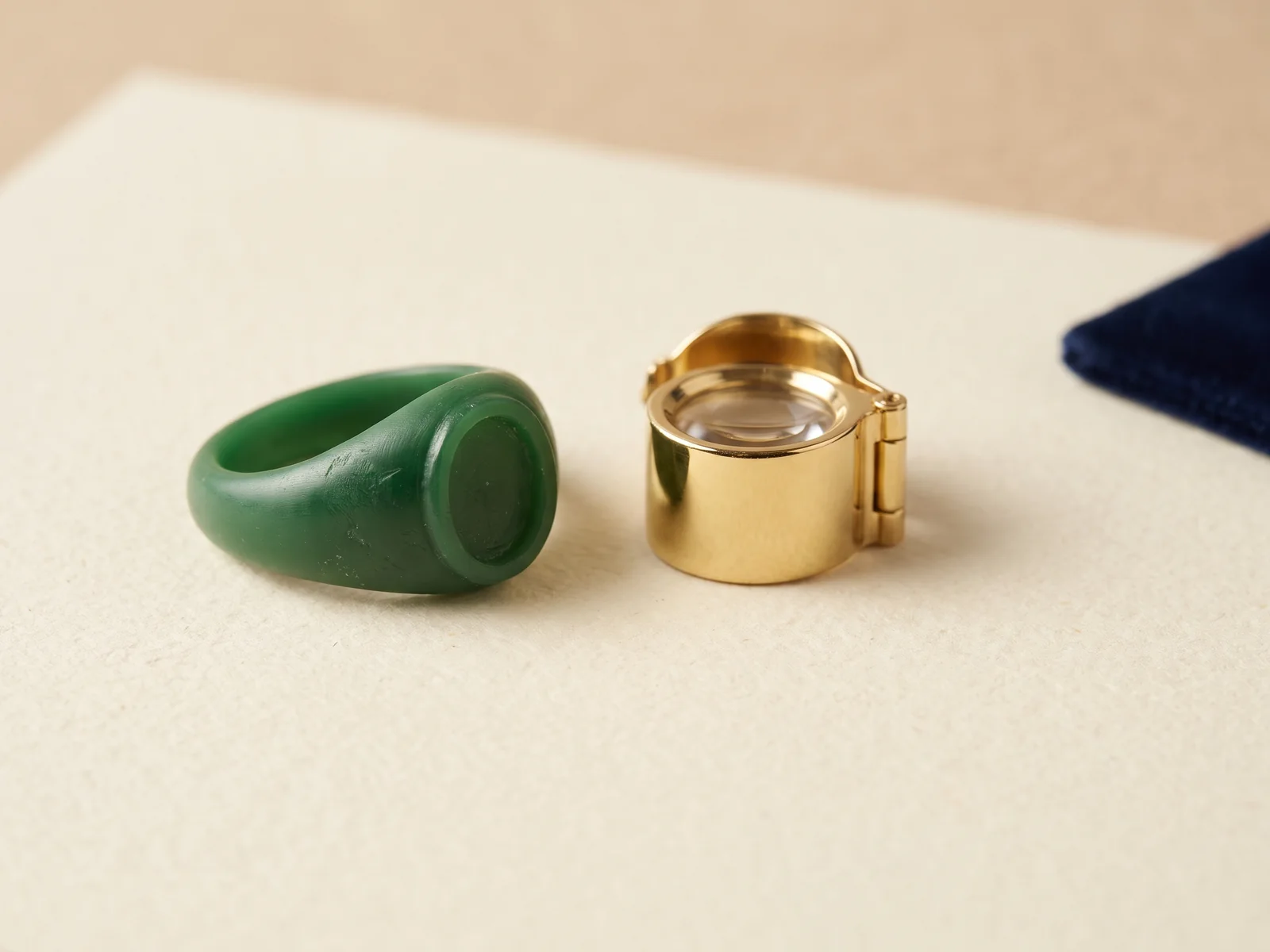
 Reviewed by Raj Sood, Graduate Gemologist (GIA), AJP (GIA)Master jeweller and Graduate Gemologist (GIA) · reviewed 4 November 2026
Quick answer
An engagement ring CAD render is a computer model of your ring before it is made. Read it by checking each view (top, side, front and through-finger), the millimetre measurements for band, claws and setting height, that the stone matches its grading report, and that a wedding band fits. Renders look idealised, so judge proportions, not polish.
What is an engagement ring CAD render?
CAD stands for computer-aided design. A jeweller or CAD designer builds your ring as a precise 3D model on screen, down to fractions of a millimetre. A render is a picture made from that model, with the software adding metal colour, reflections and a virtual stone so you can see what the ring will look like before anything is made.
The model itself is the important part. Once you approve it, the same file is used to 3D print a resin or wax model, which is then cast in gold or platinum. So an engagement ring CAD render is not just a pretty picture: it is a preview of a set of instructions. If a claw is too thin or the band too narrow in the file, it will be too thin or narrow in metal. Our overview of how designers use CAD to build a custom ring explains the software side in more depth.
CAD is not the only way to make a ring. Some rings are still fabricated entirely by hand from wire and sheet, and each method suits different designs; see the pros and cons of handmade versus CAD rings. If a word on your render or quote is unfamiliar, our plain-English jewellery glossary covers the terms used in this guide.
What views should a custom engagement ring render show?
A single glamour shot at a three-quarter angle can hide a lot. Ask for a set of standard views, ideally with the ring at your actual finger size, so you can judge it the way a jeweller does.
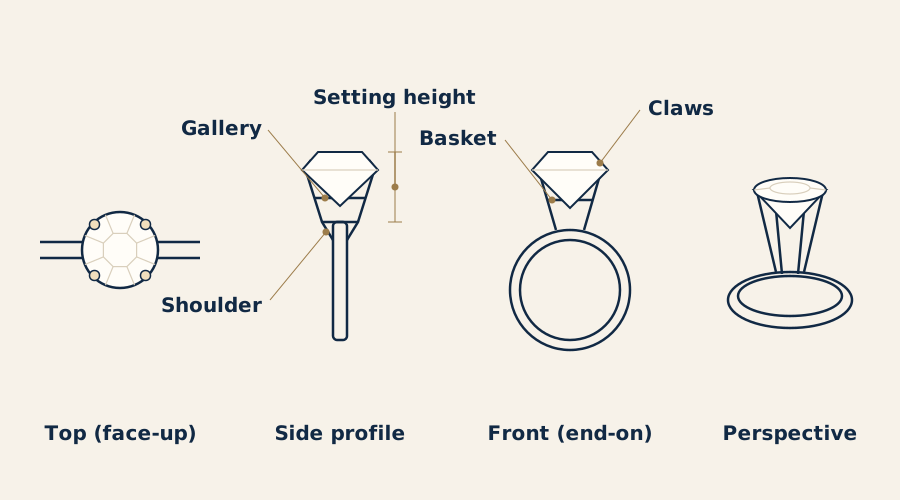
| View | What it shows | What to check |
|---|---|---|
| Top (face-up) | The ring as you see it on your hand | Stone shape and outline, claw positions, halo or pavé spacing, how wide the band looks next to the stone |
| Side profile | The ring from the side, along the finger | Setting height, the gallery (the open area under the stone), shoulders, whether a wedding band can sit beside it |
| Front (end-on) | Looking straight down the band, stone at the top | How the basket or bezel holds the stone, claw thickness, whether the stone sits centred and level |
| Perspective (3/4) | An overall impression | Proportion and style; useful, but never approve from this view alone |
| Through-finger or technical drawing | The inside of the band, often with dimensions | Band width and thickness, comfort-fit profile, any engraving |
The engagement ring side profile is the view people skip most often and regret later. It shows how high the stone sits above the finger, which affects how often it catches on jumpers and gloves, and whether a straight wedding band will touch the setting. If you are remodelling an existing piece, the designer may start from a scan rather than a blank screen; see remodelling a family ring from a 3D scan.
What measurements should you check on an engagement ring CAD render?
Renders are usually viewed zoomed in on a phone or laptop, so a 2 mm band can look chunky and a 1 mm claw can look heavy. Ignore the screen size and read the numbers. Ask your designer for a dimensioned view or a list of key engagement ring CAD measurements.
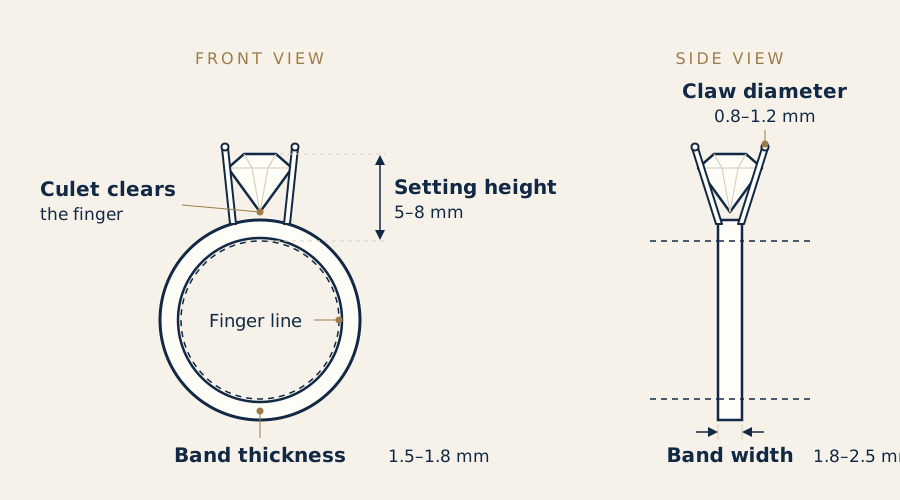
| Measurement | Typical range | Why it matters |
|---|---|---|
| Band width (at the base) | about 1.8–2.5 mm | Under about 1.6 mm can bend or wear thin over years; wider bands make a stone look smaller |
| Band thickness (depth) | about 1.5–1.8 mm | The main factor in strength; thin shanks are the most common repair |
| Claw diameter (1 ct solitaire) | about 0.8–1.2 mm | Too fine and claws wear through; too heavy and they cover the stone |
| Setting height (top of finger to table) | about 5–8 mm | Lower sits closer and catches less; higher shows more of the stone and makes room for a band underneath |
| Pavé or accent stones | about 1.0–1.8 mm each | Check spacing and that each stone has enough metal around it |
| Ring size | Australian letter size, e.g. M is about 16.5 mm inside diameter | The model must be built at your real size, not a default |
Many CAD programs also estimate the finished metal weight from the model's volume. This matters for price, because metal is charged by weight. As a guide, 18ct yellow gold has a density of roughly 15–16 g/cm³ and platinum 950 roughly 20–21 g/cm³, so the same design in platinum weighs about a third more than in 18ct gold. If your quote is based on an estimated weight, ask whether it will be adjusted to the final weight after casting and finishing; our guide to what happens between CAD approval and casting explains where small changes in weight come from.
How do you check the diamond in the render matches your stone?
The virtual stone in a CAD model should be built from the real measurements of your diamond or gemstone, not a generic shape. A 1 carat round brilliant is typically about 6.4–6.5 mm across, but every stone is slightly different, and a fancy shape such as an elongated oval diamond or a pear cut with its single point can vary a lot in length and width at the same weight. If the setting is modelled around the wrong numbers, the claws will not sit properly. Our side-by-side overview of diamond shapes shows how much outlines differ.
- Diameter or length × width: should match the grading report to within about 0.05 mm.
- Depth: decides how far the stone drops into the setting and whether the culet (the bottom point) clears the finger.
- Girdle position: the claws grip just above the girdle (the stone's outer edge), so the model needs the right girdle height.
- Shape outline: for fancy shapes, the model's outline should follow the actual stone, including any slight asymmetry.
Have the report beside you when you review. For natural diamonds, our guide to reading the measurements on a GIA report shows where the three dimensions are printed. For laboratory-grown diamonds, see checking an IGI report for a lab-grown stone; the measurement line is laid out in a similar way. If you are reusing a stone without a report, the jeweller can measure it with a gauge or scan it so the model is built to the real stone.
Not sure which one is right?
Send us the stones you are looking at and our gemologist will tell you which to choose and why.
Why doesn't a CAD render look exactly like the finished ring?
A render is a computer image, and the software makes everything look perfect: flawless polish, crisp edges and a virtual diamond with more sparkle and fire than any real stone shows under ordinary light. Metal colours can also look off depending on the screen, and white gold may appear brighter or greyer than it will in person.
| CAD render | 3D printed ring model | Finished ring | |
|---|---|---|---|
| What it is | Digital image of the model | Resin or wax print of the model | Cast, set and polished metal |
| Shows true size on the hand | No, depends on screen zoom | Yes | Yes |
| Shows metal colour and weight | Approximate only | No | Yes |
| Shows stone sparkle | Simulated, often exaggerated | No stone, or a sample stone | Real |
| Easy to change | Yes, before approval | Needs a new print | Only with remaking or major work |
Small differences between render and ring are normal. Polishing removes a little metal, claws are shaped and tightened by hand, and edges come out slightly softer than the sharp lines on screen. What should not change are the proportions: band width, setting height, the number and position of claws, and the overall style. That is why a 3D printed ring model is worth asking for if you are unsure about size or height; you can try it on and see the real scale. The resin print, casting and setting stages are where the model turns into metal.
How can you tell from a render if the ring will be comfortable to wear?
Comfort and durability are mostly decided by shapes you see in the side and front views. Look for these points before approving:
- Inside of the band: a comfort-fit (gently rounded) inside slides over the knuckle more easily than a flat one.
- Gallery and basket: the metal under the stone should be open enough to clean but not so open that it snags.
- Claw tips: rounded or slightly flattened tips catch less than tall, pointed ones.
- Shoulders: where the band rises to meet the setting; cathedral shoulders (arches rising up to the head) add height and strength.
- Culet clearance: the bottom of the stone should sit above the inside of the band so it never touches the finger.
The wedding band question is easiest to solve now. If you want a straight band to sit flush against the engagement ring, the setting must be high enough, or the gallery open enough, for the band to pass underneath. If not, you may need a contoured band shaped around it, much like the contoured bands made to sit beside a heart. Ask the designer to model the wedding band in the same file. Our guide to choosing a setting style for everyday wear covers how height, claws and band shape affect daily life.
What should you confirm before CAD ring approval?
CAD ring approval is the point where the design is locked and the model goes to print and casting. Changes after this usually cost time and money, so confirm in writing:
- The metal and its fineness, such as 18ct yellow gold, 18ct white gold or platinum 950.
- The ring size, and whether the band can be resized later (some full pavé or patterned bands cannot be resized easily).
- Every main measurement: band width and thickness, setting height, claw count and style.
- The stone details: shape, carat, measurements and report number, and whether it is natural or lab-grown.
- Accent stones: number, size and quality.
- Finish (high polish, matte or brushed), any engraving and the font.
- The estimated metal weight and how the final price is worked out.
Most designs go through a few rounds of small changes before approval, which is normal and part of the process. If you are still weighing up how a custom ring is made more broadly, revisit when hand fabrication still makes sense.
Related guideFrom CAD to Casting: How a Custom Ring Is MadeHow do GST, the Tourist Refund Scheme and insurance work for a custom ring?
These rules are rarely explained alongside custom rings, but they affect what you pay and how you are covered. This is general information only; check the current rules with the Australian Border Force, the ATO or your insurer.
GST. Jewellery bought in Australia includes 10% GST in the retail price. If you buy a ring or stone overseas and bring or send it into Australia, GST, and sometimes duty, can apply, either collected by the overseas seller at checkout or at the border, depending on its value and how it arrives. Our guide on how GST and consumer rights differ when buying overseas sets this out, including what Australian Consumer Law does and does not cover.
Tourist Refund Scheme (TRS). If you are leaving Australia, whether you are a visitor or an Australian resident travelling overseas, you may be able to claim back the GST on jewellery through the TRS. In general you need to spend A$300 or more (including GST) with one business that has an ABN, have a tax invoice, buy within 60 days before you leave, and carry the ring with you (hand luggage or worn) to show at the TRS facility at the airport. For a custom ring, the date on the final tax invoice matters, so talk to the jeweller about timing. If you claim the refund and later bring the ring back into Australia, you may need to declare it and the GST can become payable again.
Insurance for a custom engagement ring. Insurers usually want a written description and value before they will specify a ring on a policy. A useful valuation lists the metal and fineness, weight in grams, every stone's shape, carat, colour, clarity and measurements, the grading report number, and a description of the setting. Keep your approved CAD renders and dimensions with the valuation: they document exactly what was made, which helps if the ring ever needs to be remade. Arrange cover from the day you collect the ring, and check whether it is covered away from home. If you are setting a budget for the stone, our current lab-grown diamond prices in Australia give a sense of today's ranges.
Explore custom jewellery, natural diamonds and lab-grown diamonds
How to read an engagement ring CAD render, step by step
- Ask for the full set of views. Top, side, front and perspective, plus a dimensioned drawing if available.
- Confirm the ring size. Make sure the model is built at your Australian letter size, not a default size.
- Read the measurements. Check band width (about 1.8–2.5 mm), thickness (about 1.5–1.8 mm), claw size and setting height.
- Match the stone to its report. Compare the modelled stone's measurements with the grading report to within about 0.05 mm.
- Study the side profile. Look at setting height, gallery, shoulders and whether a wedding band fits beside it.
- Ask for a 3D printed model if unsure. Try it on to judge real size and height.
- Confirm everything in writing. Metal, size, stones, finish, engraving, weight estimate and price, then approve.
If any term in the drawing is new to you, look up the definitions of claw, gallery and shoulder before you sign off. For the wider decisions around stone, metal and budget, our step-by-step guide to the whole ring purchase puts the CAD stage in context, and CAD design stages and revision rounds explains what happens before the first render reaches you.
Free consultation
Talk to a gemologist
Compare stones in person or online with Raj Sood, Graduate Gemologist (GIA), AJP (GIA).
Book a consultationShop this shape
FAQ
Common questions
Will my finished ring look exactly like the CAD render?
The proportions, measurements and style should match closely, but the finish will differ slightly. Renders show perfect metal and exaggerated sparkle, while a real ring has hand-finished claws and softer edges after polishing.
How many changes can I make to a CAD design?
Most custom rings go through a few rounds of small changes before approval. Ask your jeweller how many revisions are included in the quote and when changes start to cost extra.
What band width is right for a solitaire engagement ring?
Most solitaire bands are about 1.8–2.5 mm wide and 1.5–1.8 mm thick. Thinner bands look delicate but wear and bend more easily over the years.
Can I try on a ring before it is cast?
Yes, many jewellers can 3D print a resin model from the CAD file. It shows the real size and height on your hand, though not the metal colour or the stone's sparkle.
Can I claim GST back on an engagement ring when I leave Australia?
Often, through the Tourist Refund Scheme, if you spend A$300 or more with one business, buy within 60 days before departure and carry the ring with you. Check the current rules with the Australian Border Force before you travel.
What do I need to insure a custom engagement ring?
Insurers usually ask for a written valuation listing the metal, weight and every stone's details, plus any grading report. Keeping your approved CAD renders with it documents the design if a replacement is ever needed.
Terms in this guide
Ask a gemologist
Not sure which diamond to choose?
Raj Sood is a Graduate Gemologist (GIA) and master jeweller. Bring the stones you are considering, or send the reports, and he will tell you honestly which one is better and why.
Keep learning
Related guides
 Buying Knowledge & Custom ProcessHow CAD Is Used in Custom Engagement Ring DesignBuying Knowledge & Custom ProcessFrom CAD to Casting: How a Custom Ring Is MadeBuying Knowledge & Custom ProcessHandmade vs CAD Engagement RingsBuying Knowledge & Custom ProcessEngagement Ring Buying Guide
 Certificates & ValuationsHow to Read a GIA Diamond Report
 Lab-Grown DiamondsHow to Read an IGI Report for a Lab-Grown Diamond
 GemstonesGemstone and Ring Scanning for CAD Remodelling
 Buying Knowledge & Custom ProcessLab-Grown Diamond Price Guide Australia
Explore more
More guides on this topic
Education